UI/UX That Converts: The Science Behind High-Performing Websites
Discover the UI UX best practices that turn high-bounce websites into conversion engines. Learn the science behind user behavior and high-performing design.
Let’s be honest… you’ve probably visited a website recently that looked absolutely stunning. It had crazy animations, a wild cursor effect, and video backgrounds playing on a loop. It was a digital masterpiece.
And you probably left within 10 seconds because you couldn't figure out how to actually buy the thing you came for.
Here’s where most people go wrong: They confuse "art" with "design." Art is meant to provoke thought; design is meant to solve a problem. If your website is prioritizing aesthetics over usability, you are bleeding revenue.
A high-performing website is not built on subjective opinions of what "looks cool." It is built on the science of human behavior. Let’s break down the UI UX best practices that actually drive conversions, not just compliments.
The Difference Between UI and UX (And Why You Need Both)
Before we get into the tactics, we need to clarify the baseline.
- User Interface (UI) is the aesthetic. It’s the typography, the button colors, the spacing, and the visual hierarchy. It is the surface.
- User Experience (UX) is the architecture. It is the user journey, the logical flow from point A to point B, the page load speed, and the overall friction (or lack thereof). It is the structure.
You can have a beautiful UI with terrible UX (the website looks great but is impossible to navigate). You can have excellent UX with terrible UI (Craigslist is the ultimate example: ugly, but highly functional).
To build a conversion engine, you need the perfect marriage of both.
Read Next: Branding vs Marketing: Why Most Businesses Get It Wrong
1. Cognitive Load: The Silent Conversion Killer
Every time a user lands on your site, their brain is doing mental math. They are processing the layout, reading the headlines, and trying to figure out what you want them to do. This mental effort is called cognitive load.
When cognitive load gets too high, the user experiences decision fatigue and bounces.
How to reduce cognitive load:
- Embrace Whitespace: Whitespace (or negative space) is not "empty space that needs to be filled." It is the breathing room that allows your user to focus on the important elements.
- Follow Hick's Law: The time it takes for a person to make a decision increases with the number and complexity of choices. Stop putting 12 links in your main navigation. Keep it to 5 or fewer.
- The "Squint Test": Squint your eyes while looking at your homepage. What stands out? If everything is a blur of equal weight, your visual hierarchy is broken. The eye should be drawn immediately to your primary Value Proposition and your Call to Action (CTA).
Quick check: Are you doing this?
Look at your pricing page. Does the user have to read a dense paragraph to figure out what they get, or is it presented in a scannable, check-marked list with a clear "Most Popular" tier highlighted?
2. The F-Pattern and Scanning Behavior
People do not read websites like they read books. They do not start at the top left and read every word. They scan.
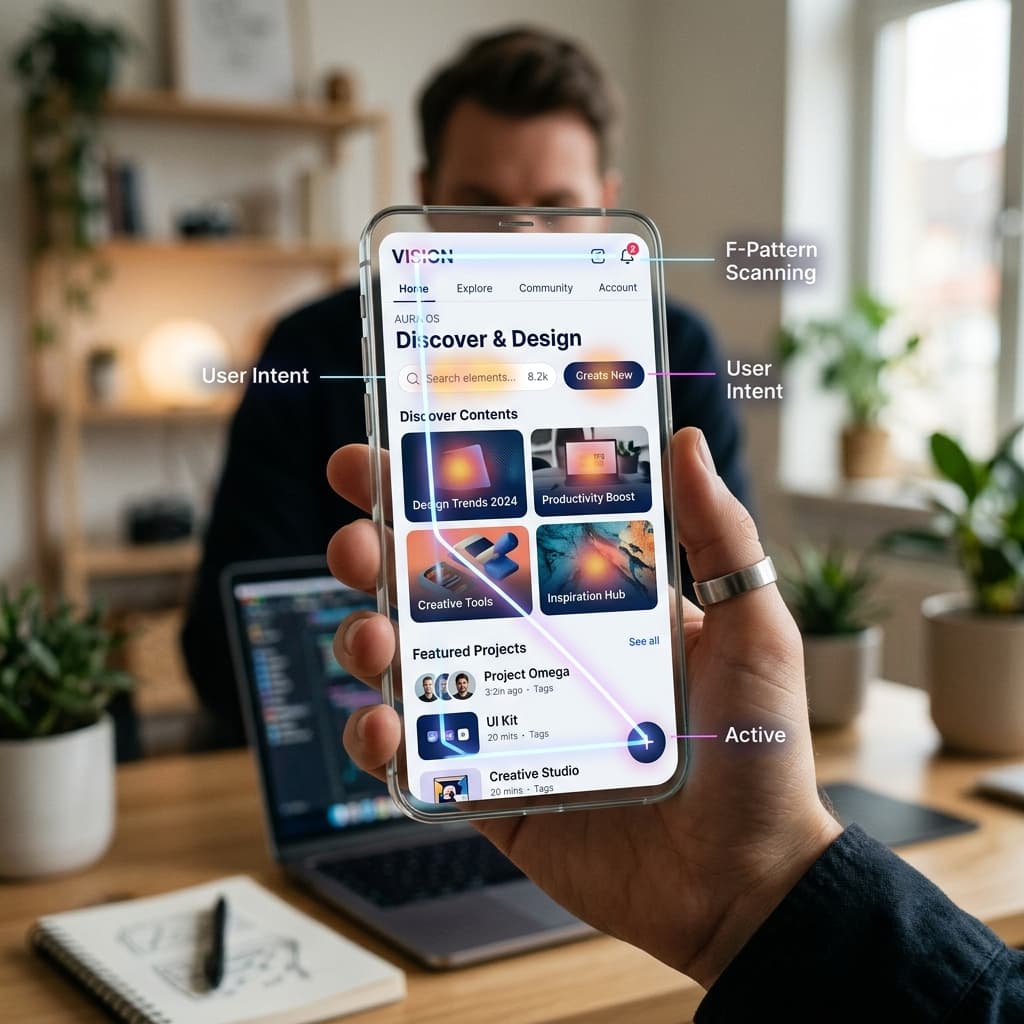
Eye-tracking studies consistently show that users scan websites in an "F-Pattern".
- They read horizontally across the top (your navigation and hero headline).
- They move down the left side of the page looking for bullet points or subheadings.
- They read horizontally across the middle.
How to design for the scanner:
- Front-load your value: Put your most important information in the first two paragraphs.
- Use descriptive subheadings: A user should be able to read only your H2s and H3s and still understand the entire pitch.
- Break up text blocks: No paragraph should be longer than three sentences. Use bulleted lists ruthlessly.
3. The Anatomy of a High-Converting CTA
Your Call to Action (CTA) button is the most important element on the page. It is the gateway to revenue. Yet, so many businesses hide it.
UI UX best practices for CTAs:
- Contrast is King: Your button color should be the most contrasting color on your palette. If your site is predominantly blue, your button should not be a slightly darker blue. It should be orange or bright yellow. It needs to pop.
- Action-Oriented Copy: "Submit" or "Learn More" are terrible, low-intent phrases. Tell the user exactly what they are getting. Use phrases like "Get My Free Audit," "Start Your 14-Day Trial," or "Book a Strategy Call."
- The Isolation Effect (Von Restorff Effect): An item that stands out like a sore thumb is more likely to be remembered. Isolate your primary CTA from other competing elements.
4. Friction and The Checkout/Lead Form
Every extra field in your lead form drops your conversion rate. Every extra step in your checkout process loses sales. This is a law of UX physics.
If you are a B2B company asking for First Name, Last Name, Email, Phone Number, Company Size, Annual Revenue, and "How did you hear about us?" on your initial contact form—stop it.
Ask yourself: What is the absolute minimum amount of information I need to move this prospect to the next stage? Usually, it’s just an email address and a first name. You can get the rest later during the nurturing phase.
Read Next: Why Your Website Isn’t Getting Leads (And How to Fix It)
5. Mobile UX is Not an Afterthought
We are well past the era of "mobile-friendly." We are in the era of "mobile-first." If a user cannot comfortably navigate your site with one thumb while holding a coffee on a moving train, your UX is broken.
- Touch Targets: Buttons and links must be large enough to be easily tapped (at least 44x44 pixels).
- Avoid complex hover states: Hover interactions don't exist on touch screens. Ensure vital information isn't hidden behind a hover effect.
- Speed: Mobile users are notoriously impatient. Optimize your images, minify your code, and ensure near-instant load times.
The Ultimate Test of UI/UX
At the end of the day, good UI/UX is invisible. When a website is designed perfectly, the user doesn't notice the design; they just accomplish their goal effortlessly.
Let's do a final self-check:
- Does your homepage clearly state what you do within the first 3 seconds of loading?
- Is there a single, prominent, high-contrast CTA visible without scrolling?
- Have you eliminated all non-essential fields from your lead capture forms?
Stop losing users to bad design. If your website looks great but isn't generating pipeline, the problem isn't your product—it’s your UX. Let’s audit your user journey, remove the friction, and design a digital experience engineered to convert. Let's optimize your UX.
Tags